Email or account ID
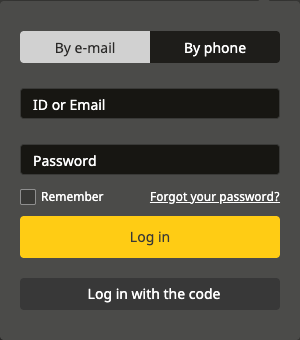
Use the email/password tab on the Nigerian form; its identifier hint also accepts an account ID or username.

Sign in with the identifier linked to your account, recover a forgotten password or find the registration route. The Nigerian login form offers email/account ID and phone options.

These links open the operator’s public pages. Check the options and local conditions shown for your account.
Open Log in on the platform where you registered, choose email/account ID or phone, then enter the account identifier and password. For code-based login, use that separate mode and follow the SMS prompt on the operator’s screen.
Use the email/password tab on the Nigerian form; its identifier hint also accepts an account ID or username.
Use the phone tab with the registered number and country code. The form has password and code-based options.
Open password recovery and use the email or phone already attached to the account. Creating a new account does not recover the old balance.
On the Nigerian website, open the login panel and select its password recovery link. The recovery dialog offers email and phone options.
For email recovery, enter the address used when registering. For phone recovery, enter the registered number and check its country code.
The email dialog says that a confirmation code will be sent to the address entered. The phone dialog displays SMS as a delivery option. Use the operator's send-code control when your details are correct.
Follow the confirmation and password instructions that appear next. Keep the code and any new password private; neither belongs in an email to this guide.
If you no longer control the registered contact, use operator support to ask about recovering access. The independent website team cannot change an Afropari account's login details.
Open the operator's website serving your location and choose Registration. Check the country and currency before completing the form, and use contact details you can access later.
The operator's published instructions describe a phone route using an SMS confirmation code. Check your country code, enter your own number and follow the displayed confirmation and currency steps.
The published email route asks for country, city, currency and personal contact details, followed by a password and its confirmation. Complete the fields shown on your current form.
Review each field for typing errors. Keep the account currency and country consistent with the platform you intend to use.
Review the operator's current conditions and age requirements before accepting them. Registration and any confirmation take place on the operator's website.
Save the account identifier and password privately. Keep access to the email address or phone number linked to the account so you can use recovery later.
For the Nigerian platform, start at Afropari Nigeria. For another market, use the operator's address applicable to your location. This guide does not establish that an account can be transferred between country platforms.
A code can appear at different points in an account journey. Read the heading on the operator's screen so you know which action you are confirming.
The published phone registration instructions use an SMS code to confirm the number supplied during sign-up. Follow the registration form rather than a login or recovery prompt.
The Nigerian site provides separate code requests for sign-in and recovery. Use the code for the action you started and continue in that same operator flow.
Keep confirmation codes within the operator's own account process. A login code does not, by itself, establish that every other account check is complete. If your account displays an additional verification request, read that request and ask operator support which information is needed.
If you report an issue, include the device, browser or app, and the wording of the on-screen message. Remove passwords, confirmation codes and personal details from any screenshot you share.
This is an independent affiliate information website. It explains the process; account login, registration and recovery take place on the operator's platform.
The Nigerian website offers phone-and-password login and a separate code-based mode with SMS displayed. Use the number associated with your account and the option shown on your current platform.
The Nigerian email login tab accepts an account ID in its identifier field. Enter it with the associated password. If you do not have the password, start recovery or ask operator support.
Open the operator's login panel and choose its password recovery link. On the Nigerian site, recovery begins with the registered email address or phone number, then a confirmation-code request.
Use the options actually displayed on your market's form. The operator's general overview describes several registration methods, while the login and recovery interfaces checked for this guide were on the Nigerian website.
No. Keep both within the operator's account process. To suggest a correction to these instructions, follow the website contact guidance without including account credentials.