Booking code
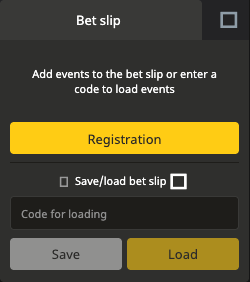
This refers to selections saved for loading into a bet slip. The Nigerian website's empty slip invites visitors to enter a code to load events. Its save/load panel contains the loading field.

On the Nigerian website, open Bet slip → Save/load bet slip → Code for loading. Follow the steps below, then review the loaded selections; a booking code is different from a promo code.

These controls were inspected on the English-language Nigerian website. Another market or app version may arrange its controls differently.
Find the Bet slip panel on the operator's website. In the checked desktop layout it appears alongside the sports listings.
Select Save/load bet slip. The panel reveals a Code for loading field and separate Save and Load buttons.
If you have a booking code intended for that platform, copy it into the loading field. Check that it contains only the supplied code, without a surrounding message or accidental spaces.
Use Load when the form allows it. If selections appear, review them using the checklist below. If a message appears instead, follow that message or the help steps on this page.
The same panel includes a Save control. Follow the operator's on-screen instructions for the selections you have chosen; this guide does not reproduce an untested generated code or claim that saving confirms a wager.
The word “code” can refer to different tools. Start with what you want to do, then use the matching field.
This refers to selections saved for loading into a bet slip. The Nigerian website's empty slip invites visitors to enter a code to load events. Its save/load panel contains the loading field.
A promo code relates to a particular offer and its eligibility rules. It is not a substitute for a code that loads selections. Read the bonus and promo code guide for offer conditions.
The Nigerian Bet slip check page asks for a bet slip number and says that number is in the account's bet history. Use that tool for the corresponding recorded bet, rather than treating it as the booking-code loading field.

Loads selections into a bet slip. Check every selection and the current odds.
Relates to an offer. Check eligibility, activation and terms separately.
A shared code is a starting point for reviewing selections. It does not tell you whether every detail is still suitable or whether a bet has been accepted.
The operator's instructions describe placement and acceptance separately from building a slip, and point to Recent bets or My Account → Bet history for recorded bets. Use your account record to establish what was accepted; the booking code alone is not proof.
Use the message shown on the operator’s screen to choose the relevant check below.
Ask whether it is a code for loading selections, a promotion code or a number from bet history. Return to the matching tool rather than trying the same value in every field.
Compare the pasted value with the original. Ask the sender which operator website or market it was saved on; compatibility between platforms has not been established here.
If the response refers to an unavailable event or selection, read it before continuing. Ask the sender to confirm the intended events. We have not verified a universal expiry period for booking codes.
Use operator support and include the platform, device and message displayed. Share account details only through the operator's appropriate channel; this independent guide cannot retrieve a private bet slip.
Do not treat a failed load as an instruction to deposit, change your stake or create another account. Resolve the code or platform question first.
On the checked Nigerian website, open the bet slip's save/load panel and use the field labelled Code for loading. The steps above identify the controls.
No. A booking code refers to selected bets; a promo code relates to an offer. The comparison also explains the separate bet slip number used by the checker.
A saved or loaded set of selections is not proof of an accepted bet. Read the operator's confirmation and check the account's bet history for a recorded wager. Review any one-click settings before interacting with odds.
Look for the equivalent save/load tool in your app and follow its labels. This guide directly checked the website panel, not the app flow. The Android guide and iPhone guide cover available access routes.
Do not assume that they do. Ask which platform generated the code and check with the operator if you use a different market. Cross-platform loading has not been verified here.
No result is guaranteed. Review the odds, selections and status displayed when you open the slip; a shared code or screenshot does not establish a fixed price or an accepted wager.